Six criteria that decide whether a printer fits your miniatures
Every printer can produce a recognizable figure. The differences show up when you look at a face up close, when you want a whole warband in one sitting, and when it is time to clean up. Judge any candidate by these six things before you read a single review.
1. Detail capability. A 28–32 mm miniature is a detail test: facial features, fingers, thin blades, and cloth folds all sit within a few millimeters. Resin printers generally reproduce that detail more faithfully because they cure a liquid layer against a light source rather than pushing melted plastic through a nozzle. In a listing, look for the manufacturer's stated XY resolution and minimum layer height, whether anti-aliasing is supported, and what kind of light source the machine uses. If a page does not state these, treat it as a question to ask, not a spec to assume.
2. Build volume for minis versus terrain. A small plate is ideal for character minis but will make terrain a chore; a large plate handles buildings and tanks but takes more resin, more cleaning, and more bench space for every small print you run. Before you compare numbers, decide the largest single piece you realistically want this year. Then check the build volume in all three axes, not just the plate footprint, because tall pieces such as banners and big monsters need Z height too.
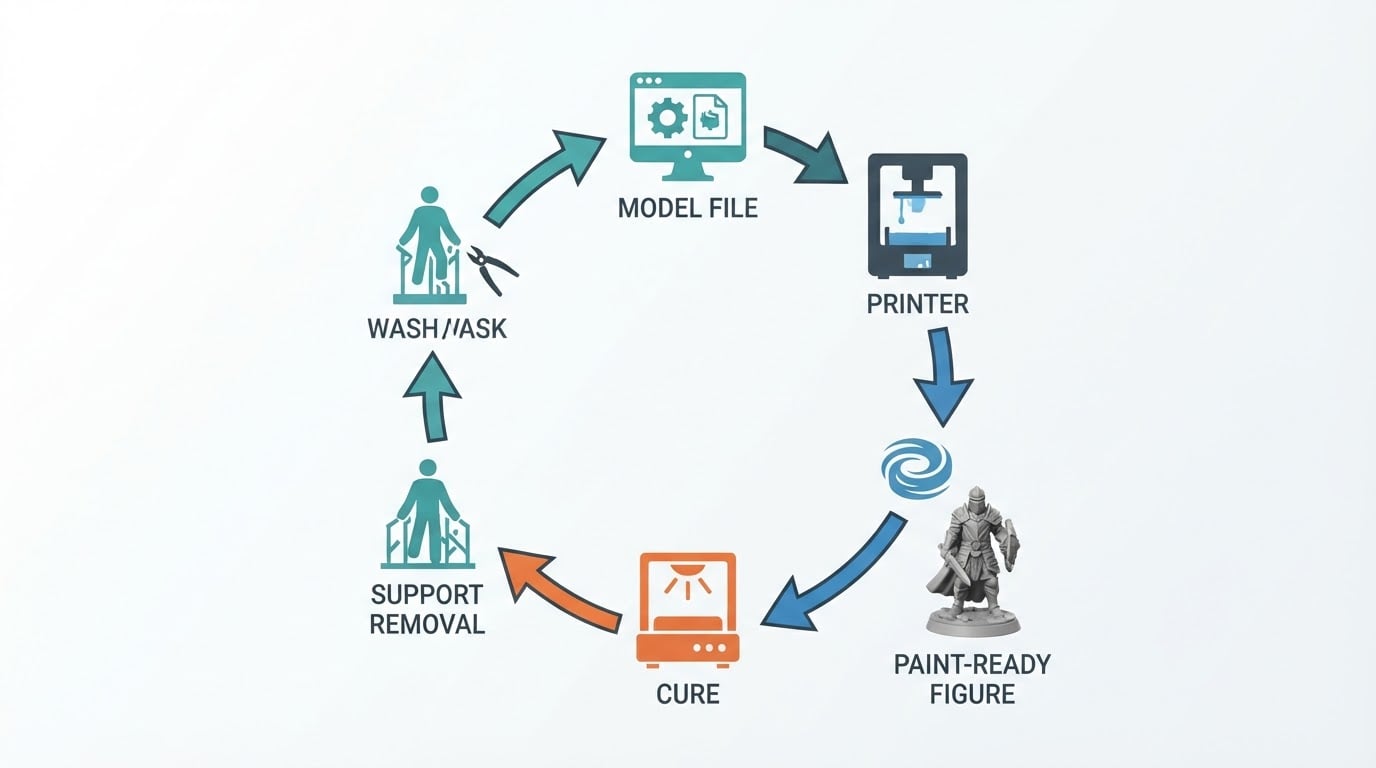
3. Workflow and resin safety. The printer is only one station in a loop that includes washing, curing, support removal, resin storage, and waste handling. For an apartment workbench, decide up front where uncured resin will be handled, where prints will drain, where the wash and cure station will live, and how the space will be ventilated. Check whether the printer needs a separate wash-and-cure setup, how large those tanks are, and whether the containers can be closed between sessions. Gloves, eye protection, and a no-food, no-drink work surface belong in the plan, not in a later upgrade.
4. Maintenance and calibration. Wear items are the quiet cost of resin printing. The release film at the bottom of the vat is a consumable, the LCD screen ages with use, and the build plate needs to stay level. In a listing, check how the machine levels, whether the release film can be replaced by the owner, and whether the screen and vat are sold as spare parts in your region. For filament printers, look at nozzle, belt, and hotend availability. A machine with a documented parts chain is easier to live with than a slightly cheaper one without.
5. Noise and footprint. Apartment printing has two physical limits: sound and space. Measure the actual bench width, depth, and the height you need with the lid open, then add room for the wash and cure station, resin bottles, and the drip tray. Think about when you will print, too: a machine that runs overnight beside a bed is a different purchase from one that runs on a weekend afternoon. Listen for fan noise, Z-axis movement, and whether you can hear it through a wall. If possible, hear the model running in person.
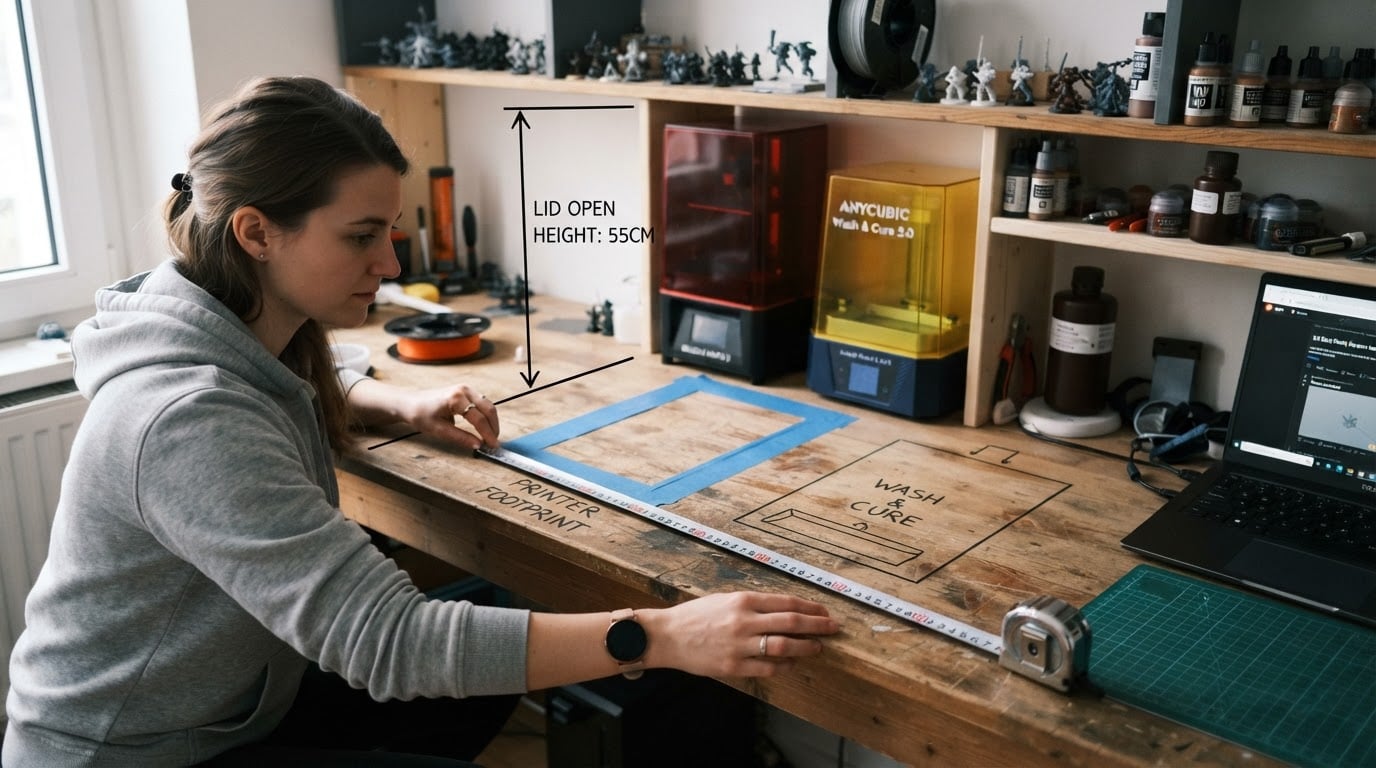
6. Total cost of ownership. The sticker price rarely stays the whole cost. Resin, isopropyl alcohol, gloves, filters, replacement film, replacement screens, and failed prints all add up, and so does the wash-and-cure gear. For filament printing, count filament, nozzles, and the post-processing tools that smooth layer lines. Use the checklist at the end of this guide as a cost worksheet before you commit.
Best for X: the printer profiles that fit different beginners
No single machine is best for every miniature habit, and generic "top ten" claims rarely survive contact with your bench. The profiles below are the ones worth shortlisting. For each, the line at the top tells you who it suits, and the verification list tells you what the listing must prove before you buy.
Best for painting-focused detail on 28–32 mm minis → a small-plate, high-resolution resin printer
A small plate with a fine light source is the classic first machine for character painters, because it puts almost all of the budget into detail instead of volume.
- Pros: generally the finest detail available to a home hobbyist; small footprint for a desk or shelf; low resin volume per print, so small mistakes waste less material.
- Cons: the plate is too small for buildings and large monsters; you still need the full wash, cure, and ventilation loop; resin handling is unforgiving if you are careless.
- Verify in the listing: stated XY resolution, minimum layer height, anti-aliasing support, plate dimensions, compatible resin types, and the price and availability of replacement film and screens.
Best for mixed minis and small terrain → a mid-size resin printer
If your queue includes a small building, a monster, or a vehicle alongside your infantry, the extra plate area saves a lot of batching.
- Pros: more figures per run; small terrain and bases fit without splitting; fewer cleaning sessions.
- Cons: a bigger vat means more resin sitting exposed; leveling matters more across a larger plate; the machine needs more bench depth.
- Verify in the listing: build volume in all three axes, vat capacity, leveling method, how evenly the light source covers the plate, and whether the release film is a standard size.
Best for apartment newcomers who want one tidy loop → a resin printer bundled with a matching wash-and-cure station
Bundles are not automatically better value, but a matched set removes a lot of guesswork about tank sizes and storage.
- Pros: one purchase covers printing, washing, and curing; matched tank and chamber sizes simplify the workflow; fewer loose containers on the bench.
- Cons: the included station is sometimes smaller than your tallest prints; a bundle can hide a weak component behind a headline price; the whole set still needs proper ventilation.
- Verify in the listing: the internal height and diameter of the cure chamber against your tallest piece, the wash tank capacity, whether liquid containers seal, and the availability of spare baskets and turntables.
Best for terrain, bases, and big props → a filament printer
If your table needs hills, walls, and scatter terrain more than display-level faces, filament printing trades fine detail for volume and simple materials.
- Pros: no liquid resin, no alcohol wash, and no curing step; larger builds for the same bench space; filament is easy to store and swap.
- Cons: visible layer lines on small figures; more sanding, filler, and priming work on detail pieces; nozzle and cooling behavior shape the surface quality.
- Verify in the listing: nozzle size options, layer-height range, bed size, whether an enclosure is available, and how easy the hotend and belts are to replace.
Best for shared homes with kids or pets → an enclosed or filtration-capable resin setup
The safest resin setup is the one that keeps the mess contained, especially when the printer lives in a room other people use.
- Pros: contains odor and spills better than an open printer; a door and filter keep small hands away from wet prints; easier to keep the workflow in one zone.
- Cons: costs more and occupies more space; containment does not remove the need for gloves, ventilation, and careful disposal.
- Verify in the listing: how the enclosure vents, the filter type and replacement schedule, whether the door seals, the noise level in a small room, and whether you can route exhaust to a window.
Resin versus filament for miniatures: the honest trade-off
What you are deciding | Resin (photopolymer) | Filament (FDM) |
|---|---|---|
Detail on a 28–32 mm figure | Typically the strongest option for faces, fingers, and thin shapes | Layer lines and nozzle width make fine features harder to keep crisp |
Build volume and bench space | Small, dense prints; a compact machine covers a squad | Larger builds per machine, but a bigger footprint and slower detail work |
Safety and cleanup | Liquid resin, alcohol washing, curing, gloves, and ventilation are mandatory | Dry process, but dust, some material fumes, and post-processing debris still need control |
Apartment fit | Best with a dedicated, ventilated corner and a wash-and-cure station | Easier to run dry, but noise and odor depend on the material and enclosure |
Learning curve | More steps before the first paint-ready mini, and more ways to make a mess | Simpler first print, more finishing work before a detail piece looks good |
Where it wins | Character minis, warbands, and display pieces | Terrain, bases, props, and large table features |
The before-you-buy checklist
Work through this list with the listing open. If you cannot answer a question, that is the thing to ask the seller or manufacturer before you order.
- Measure the bench. Width and depth for the printer plus the wash-and-cure station, and height with the lid open.
- Name your largest piece. The biggest single model you want in the next year sets the minimum build volume.
- Find the detail numbers. XY resolution and minimum layer height, plus whether the software supports anti-aliasing.
- Confirm the workflow parts. Printer, wash, cure, resin storage, drip tray, and gloves as one purchase plan.
- Plan the air and the waste. Decide where uncured resin, used alcohol, and failed prints will go before the machine arrives.
- Check the wear items. Release film, screen, nozzles, and belts: price, availability, and whether you can replace them yourself.
- Check leveling. Automatic or manual, and what the process looks like on a bad day.
- Check the noise plan. When will it run, who shares the wall, and can you test it before buying.
- Check the software chain. Which slicer is supported, which file formats it accepts, and whether profiles are actively maintained.
- Write the real total. Printer, wash and cure, resin or filament, personal protection, spares, enclosure or ventilation, and a margin for failed prints.
How to judge a listing in five minutes
- Open the specification table and find four numbers: XY resolution, minimum layer height, build volume, and light source type for resin, or nozzle size and layer height for filament.
- Confirm whether the wash-and-cure gear is included or sold separately, and whether the sizes match.
- Look for the manual. If the manufacturer does not publish one, ask for it before you buy.
- Check that wear parts are sold in your region, with a part number and a price.
- Read the warranty length and the return policy, especially for bundles and used machines.
- Treat "best" claims, star ratings, and ranking badges as marketing until the machine matches the criteria you wrote down at the start.
A printer that fits your bench, your models, and your cleanup habits will beat a better-specified machine that you avoid using. Write your criteria down first, verify them in the listing, and buy the machine that answers the most of them.
If you have chosen FDM for terrain or larger miniatures, the Bambu Lab A1 mini versus A1 comparison connects the documented build envelopes and nozzle options to that narrower decision. It is a specification comparison, rather than a print-quality test.