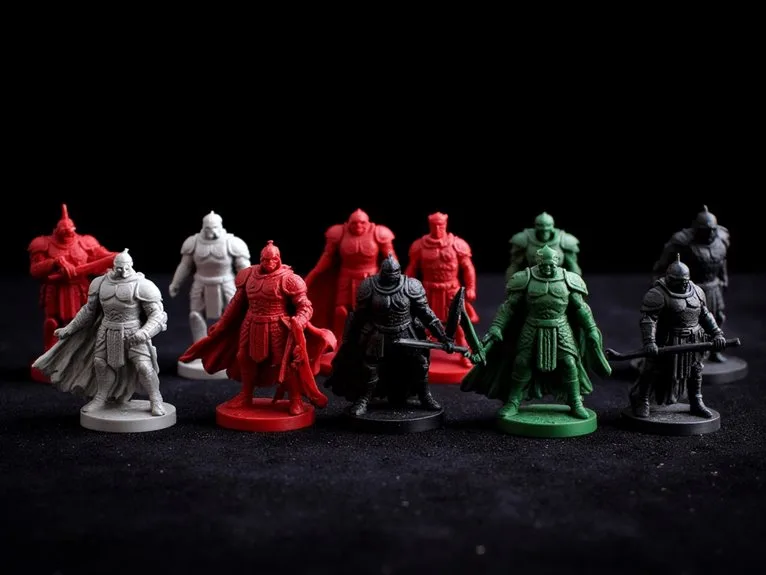
3D Printer for Miniatures:
Resin vs FDM Compared
For fine detail on figures, resin is often the more direct choice. FDM can handle large prints with a simpler workflow, but actual detail depends on the machine, material, and settings. This guide covers where each type fits, what finishing involves, and how to match a printer to the models you actually paint.
Match the Printer to What You Print
Figures and fine detail
Faces, hands, armor edges, and small text are where resin's small-pixel projection often helps. If most of your models are figures, compare XY pixel size, Z layer height, and the resin's own detail; exposure and supports also affect the result.
Bases, terrain, and large pieces
FDM handles large single prints and skips the wash-and-cure cycle. Visible layer lines depend on nozzle and layer height; plan for sanding or filling on smooth surfaces.
Figures plus terrain
Many hobbyists start with resin for figures and add an FDM printer later for terrain. Choose your first printer around the models you print most.
Resin vs FDM for Miniatures
| Factor | Resin | FDM |
|---|---|---|
| Fine detail | Specified by XY pixel size and Z layer height; actual detail also depends on exposure, optics, resin, supports, and settings | Specified by nozzle diameter and layer height; fine features may need a smaller nozzle, slower printing, and finishing |
| Surface preparation | Wash and post-cure per the resin maker; support-removal timing and sanding depend on the resin and workflow | Remove supports, then sand layer lines on visible surfaces |
| Durability | Cured resin is hard, but thin parts can be brittle | Material choice matters: PLA is generally rigid, while PETG and ABS are often tougher, though geometry and settings also affect strength |
| Workspace | Needs airflow, nitrile gloves, and a cleanable area for uncured resin and wash liquid (water or solvent per resin) | Needs a stable surface and a clear area around the hot nozzle; ventilate the space for all filaments, especially ABS, ASA, and other high-emission materials |
What Pixel Size and Layer Height Mean for Your Models
A resin printer cures each layer through a screen. XY pixel size describes the horizontal sampling of that screen, while Z layer height describes vertical step size. They are different axes, not one "resolution" number. Finer figures can help with faces, insignia, and tiny weapons, but exposure, optics, resin, supports, and settings also shape what actually prints.
FDM detail is limited by nozzle diameter and layer height as well as extrusion and cooling. Small features can blur or fill in, so FDM is often a better fit for larger, simpler parts. Compare each maker's definitions and sample prints rather than a single micron cutoff.
Getting 3D Printed Miniatures Ready to Paint
Resin Post-Processing Steps
Wash
Wash uncured resin from the print using the liquid and procedure the resin maker specifies — solvent or water-washable, depending on the resin.
Cure
Post-cure as the resin maker specifies for time and wavelength; do not assume a fixed exposure.
Remove supports
Remove supports at the stage your resin and workflow call for — some are removed before post-curing — then clean the contact points.
Sand
Sand as needed with fine paper to remove support marks and layer artifacts; the right grit depends on the resin and the surface.
Prime, Paint & Varnish
Apply primer, add colors, and seal with varnish.
Uncured resin and contaminated wash liquid are hazardous waste. Wear nitrile gloves, avoid skin contact, keep the area ventilated, and dispose of waste through your local hazardous-waste service — never down the drain. Follow the resin maker's safety data sheet.
"FDM prints skip washing and curing. Remove supports, sand visible layer lines, then prime and paint the same way."
Resource Links
Choose by Needs and Upgrade Over Time
Starter
Pick a resin printer for figures. Choose a build plate that fits the models you print most, and budget for wash supplies (water or solvent per resin), nitrile gloves, and cure equipment.
Regular hobby use
Choose a larger build plate if you print batches or bases, and check the printer's list of compatible resins before you buy.
Upgrade path
Add an FDM printer when terrain, large bases, or tougher functional parts become a regular need. Keep the resin printer for figures.
Marketplace prices and rankings change often, so this guide compares each candidate's published specification sheet instead — build volume, XY pixel size, Z layer height, light source or nozzle, material compatibility, and wash/cure requirements — and confirms the current version with the maker before buying.
Workspace, Ventilation, and Resin Safety
Resin printing needs a space with airflow, a surface you can clean, and protection for your hands. Wear nitrile gloves when handling uncured resin and wash liquid (water or solvent, per the resin). Keep them away from food, children, and pets, and read the resin maker's safety data sheet before first use.
An FDM printer needs a stable surface and a clear area around its hot nozzle and bed. Keep it away from children and pets, and ventilate the room for all filaments — especially ABS, ASA, and other materials whose maker recommends it.
Check Your Build Volume Before You Order
A printer's build volume decides whether a model prints in one piece. Enter your model's dimensions into the build volume checker to see whether it fits. Then use the print cost calculator to estimate what a print costs before you commit.
Frequently Asked Questions
Is resin better than FDM for miniatures?
For fine detail on figures, resin is often the better fit, though the result still depends on exposure, optics, resin, supports, and settings. FDM suits larger prints and a simpler workflow with no washing or curing step.
Can an FDM printer print miniatures?
Yes. Layer lines are more visible, and small features such as faces and fine text can blur, so results depend on the model and how much finishing you are willing to do.
Do resin prints need washing and curing?
Most photopolymer resins need washing and post-curing, but the liquid (water or solvent), times, and support-removal stage are set by the resin and printer makers. Follow their instructions.
How much space does a resin printer need?
Plan for a stable surface, airflow, and room for a wash and cure station. Check the printer's dimensions before you buy.